


Hud Configuration
Since we have two sets of huds (EEWA UI and Grimoire) you might want to choose to turn one off. Here I will explanation how you can set up your hud the way you like it most.
EEWA UI
Keeping only the Vanilla Hud
If you don't want to see EEWA at all, just the vanilla hud, it's best to completely disable it in the UI Settings.
1. Click TAB and open your inventory. On the Bottom Look for the UI Settings

2. Go down to PERSONAL UI SETTINGS and uncheck Custom Personal UI.
This will make sure you ONLY see the Conan Exiles Vanilla Hud.

Grimoire Hud
1. Disable the Grimoire Hud
If you don't want to see the Grimoire Hud at all.
1. Press Esc to go to the main menu and look for the Grimoire Logo.

2. Click on it and look for Character Hud Indicators on the left side.
Set it from Grimoire to Classic
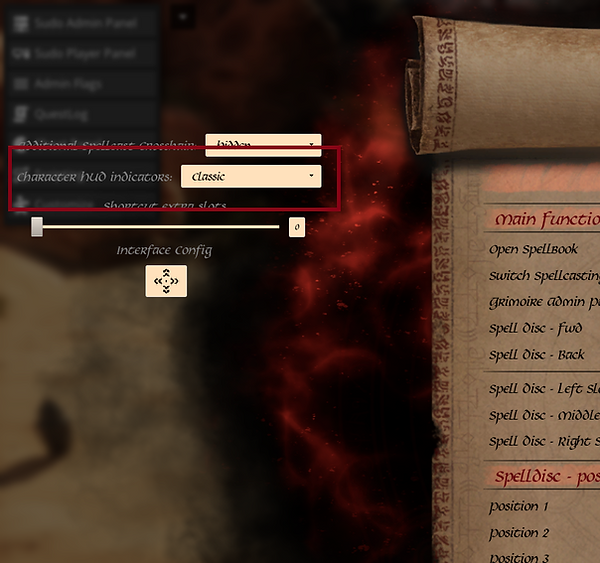
2. Keeping only the Grimoire Hud
You will see that when you activate the Grimoire Hud. EEWA will pop up no matter what you do in the UI Settings. The only way out is to move EEWA off Screen.
1. Follow the advice above and open the Personal UI Settings Again
2. This time make sure BOTH
Custom Personal UI
AND
Centered UI Stats
have checkmarks
3. Look for the Centered UI Custom Position [Marked with a red block in picture below]
Make the second value something huge, you can see mine is set to 1500.
Close the UI Settings

EEWA & Grimoire
Now if you are like me, you aren't happy with just one, so why not have EEWA and a little bit of Grimoire. Thanks to Grimoire being fully customizable we can do something like this.

1. Follow the instruction above and open the Grimoire Settings Panel and click on Interface Config

2. Here you can turn on or off certain features (like damage, the healthbar, the buff bar) by
Right clicking on the EYE
OR
Making them so small you can't see them

3. Here you can see the lay out I used to achieve the layout above, remove the buffs on the left hand side and see EEWA Indicators.

4. You can get more information by clicking on the ? on the right of the Interface Configuration Screen.